
ROS 통신 메세지
본 섹션에서는 시뮬레이터에서 지원하는 통신에 따라, 주고받는 메시지의 종류 및 데이터 구조 등에 대한 ROS 메시지 프로토콜에 대해 기술한다.
ROS 통신 메시지
Network Settings 에서 제공하는 Ego Network 및 Simulator Network 에서 ROS 통신 방식에 따라 주고받는 메시지 타입 및 메시지 토픽, 메시지 구조에 대해 설명한다.
ROS 메세지 파일 다운로드 링크
개발용 Linux 환경에 직접 다운로드 가능하도록 아래 GitHub 링크를 제공한다. 24.R1.0 UPDATE
Ego Network (통신 방식: Publish - Subscribe Model)
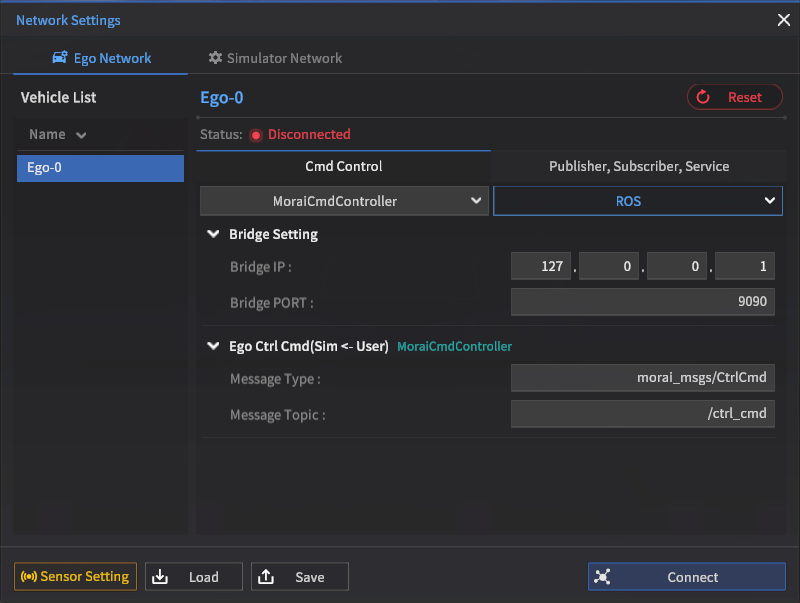
Cmd Control
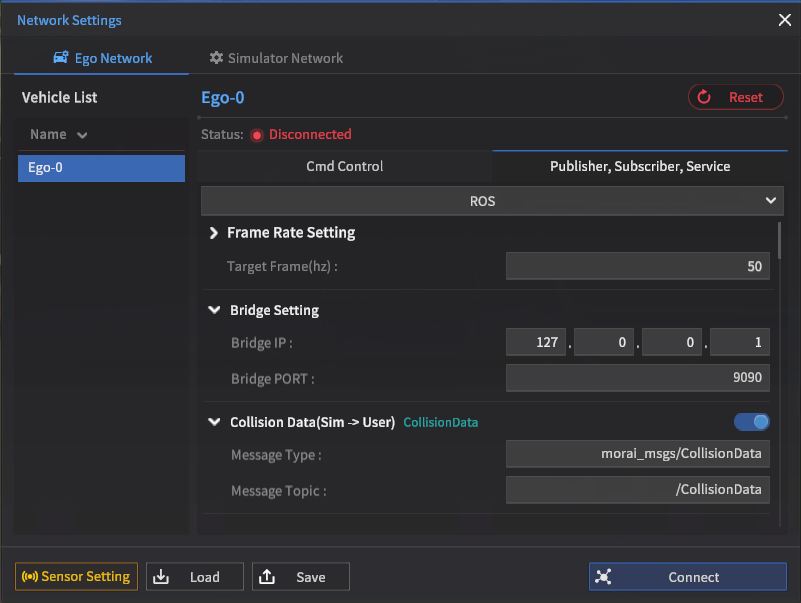
Pulisher, Subscriber, Service
Ego Ctrl Cmd
차량 제어 명령
MoraiCmdController
Message Type : morai_msg/CtrlCmd
Default Topic : /ctrl_cmd
타입 설명 : Ego 차량을 제어하기 위한 메시지
No | Name | Type | Unit | Remarks |
|---|---|---|---|---|
1 | longlCmdType | int32 | - | 제어 방식을 결정하는 인덱스 |
2 | accel | float64 | - | 차량의 가속 패달 값을 의미하며 0~1 범위를 가진다. |
3 | brake | float64 | - | 차량의 브레이크 패달 값을 의미하며 0~1범위를 가진다. |
4 | front_steer | float64 | - | 전륜 조향 제어 명령
|
5 | rear_steer | float64 | - | 후륜 조향 제어 명령
|
6 | speed | float64 | km/h | ( Only active if CmdType == 2 ) |
7 | acceleration | float64 | m/s2 | ( Only active if CmdType == 3 ) |

23.R1.0에서는 아래의 신규 모델 Controller에 대한 CtrlCmd 메시지가 추가되었다.
WeBOTCmdController
WeBOTCmdController
Message Type : geometry_msgs/Twist
Default Topic : /commands/vel
Ground Vehicle Direct Ctrl Cmd 24.R1.0 UPDATE
차량 및 로봇에 대한 제어 명령 (User → Sim)
Message Type : morai_msg/GVDirectCmd
Default Topic : /gv_direct_cmd
타입 설명 : Wheel-based Ground Vehicle 을 직접 제어하기 위한 메세지
No | Name | Type | Len [byte] | Description |
|---|---|---|---|---|
1 | steer_type | uint32_t | 4 | Table 1 참조 |
2 | throttle | float | 4 | -1~1 |
3 | skid_steering | float | 4 | -1~1 |
4 | steer_angle | float[10] | 40 | -1~1 |
Ground Vehicle State Ctrl Cmd 24.R1.0 UPDATE
차량 및 로봇의 target State 제어 명령 (User → Sim)
Message Type : morai_msg/GVStateCmd
Default Topic : /gv_state_cmd
타입 설명 : Wheel-based Ground Vehicle 의 Target State 제어를 위한 메세지
No | Name | Type | Len [byte] | Description |
|---|---|---|---|---|
1 | TargetLongitudinalVelocity | float | 4 | m/s |
2 | TargetAngularVelocity | float | 4 | rad/s |
Ghost Ctrl Cmd
차량 제어 명령
Ghost Mode Ego
Message Type : morai_msgs/GhostMessage
Default Topic : /ghost_ctrl_cmd
타입 설명 : Ghost Mode 이용 Ego 차량을 제어하기 위한 메세지
Ghost Mode : 차량을 원하는 위치에 생성 할 수 있는 모드이다.
No | Name | Type | Unit | Remarks |
|---|---|---|---|---|
1 | position | m | ego 차량의 위치 지정 (X, Y, Z) | |
2 | rotation | deg | ego 차량의 회전 지정 (roll, pitch, yaw) | |
3 | speed | float64 | km/h | ego 차량의 속도 |
4 | steer_angle | float64 | deg | ego 차량 앞바퀴 조향 각도 |
NPC Ghost Cmd
차량 제어 명령
Ghost Mode NPC
Message Type : morai_msgs/NpcGhostCmd
Default Topic : /NpcGhost_Topic
타입설명 : NPC Ghost mode에서 Npc Vehicle을 생성 (Control) 하는 메세지
Name | Type | Unit | Remarks |
|---|---|---|---|
header | Header | - |
|
npc_list | - | NPC Ghost Vehicle 정보 |
NPC Ghost Info
NpcGhostInfo는 NPCGhostCmd에서 사용하는 목록으로 ROS Topic 이 없음.
ROS message details
Message Type: morai_msgs/NpcGhostInfo
NOTE 차량의 위치 값은 ENU 좌표계로 입력함.(x: east, y: north, z: up)
No | Name | Type | Unit | Remarks |
|---|---|---|---|---|
1 | unique_id | int32 | - | Npc Ghost Vehicle의 unique_id 값 (e.g. 2,3,4..) |
2 | name | string | - | Npc Ghost Vehicle의 모델 이름 (e.g 2016_Kia_Niro(HEV)) |
3 | position | m | Npc Ghost Vehicle의 위치 지정 (X, Y, Z) | |
4 | rpy | deg | Npc Ghost Vehicle의 회전 지정 (roll, pitch, yaw) |
Ego Vehicle Status
차량 상태 정보
MoraiInfoPublisher (Sim → User)
Message Type : morai_msgs/EgoVehicleStatus
Default Topic : /Ego_topic
타입 설명 : 제어 차량의 상태 정보를 나타내는 메시지
Name | Type | Unit | Remarks | |
|---|---|---|---|---|
| 1 | header | Header | - | Message header |
| 2 | unique_id | int32 | - | 오브젝트의 unique id 값 |
| 3 | acceleration | m/s2 | ego 차량의 현재 가속도 벡터 값 | |
| 4 | position | m | ego 차량의 현재 위치 | |
| 5 | velocity | m/s | ego 차량의 현재 속도 벡터 값 | |
| 6 | angular_velocity | deg/s | 차량의 중심 기준 회전 각속도 | |
| 7 | heading | float64 | deg | 차량의 heading (deg)를 나타냄 |
| 8 | accel | float32 | - | 차량의 가속 패달의 상태 값 0~1 범위를 가진다. |
| 9 | brake | float32 | - | 차량의 브레이크 패달의 상태 값 0~1 범위를 가진다. |
| 10 | front_steer_angle | float32 | deg | 차량의 현재 앞 바퀴 조향각 |
| 11 | rear_steer_angle | float32 | deg | 차량의 현재 뒷 바퀴 조향각 |
| 12 | tire_lateral_force_fl | float | N | Tire force - 앞축 왼쪽 휠 |
| 13 | tire_lateral_force_fr | float | N | Tire force- 앞축 오른쪽 휠 |
| 14 | tire_lateral_force_rl | float | N | Tire force- 뒷축 왼쪽 휠 |
| 15 | tire_lateral_force_rr | float | N | Tire force- 뒷축 오른쪽 휠 |
| 16 | side_slip_angle_fl | float | deg | 사이드 슬립 앵글 - 앞축 왼쪽 휠 |
| 17 | side_slip_angle_fr | float | deg | 사이드 슬립 앵글- 앞축 오른쪽 휠 |
| 18 | side_slip_angle_rl | float | deg | 사이드 슬립 앵글- 뒷축 왼쪽 휠 |
| 19 | side_slip_angle_rr | float | deg | 사이드 슬립 앵글- 뒷축 오른쪽 휠 |
| 20 | tire_cornering_stiffness_fl | float | N/deg | Cornering Stiffness - 앞축 왼쪽 휠 |
| 21 | tire_cornering_stiffness_fr | float | N/deg | Cornering Stiffness - 앞축 오른쪽 휠 |
| 22 | tire_cornering_stiffness_rl | float | N/deg | Cornering Stiffness - 뒷축 왼쪽 휠 |
| 23 | tire_cornering_stiffness_rr | float | N/deg | Cornering Stiffness - 뒷축 오른쪽 휠 |
| 24 | distance_left_lane_boundary | float | m | 가장 가까운 Link의 좌측 차선 경계선까지의 거리 (원본 데이터에 차선 경계 정보가 없으면 미출력) |
| 25 | distance_right_lane_boundary | float | m | 가장 가까운 Link의 우측 차선 경계선까지의 거리 (원본 데이터에 차선 경계 정보가 없으면 미출력) |
| 26 | cross_track_error | float | m | 좌측 차선 거리 − 우측 차선 거리 (원본 데이터에 차선 경계 정보가 없으면 미출력) |
Object Info
주변 물체 정보
MoraiObjectInfoPublisher (Sim → User)
Message Type : morai_msgs/ObjectStatusList
Default Topic : /Object_topic
타입 설명 : 사용자가 배치한 주변 물체들에 대한 정보를 나타내는 메시지
No | Name | Type | Unit | Remarks |
|---|---|---|---|---|
1 | header | Header | - |
|
2 | num_of_npcs | int32 | - | 사용자가 배치한 npc 차량의 개수 |
3 | num_of_pedestrian | int32 | - | 사용자가 배치한 pedestrian의 개수 |
4 | num_of_obstacle | int32 | - | 사용자가 배치한 obstacle(static objects)의 개수 |
5 | npc_list | - | npc 차량 정보 (아래의 ObjectStatus 타입 참고) | |
6 | pedestrian_list | - | pedestrian 정보 (아래의 ObjectStatus 타입 참고) | |
7 | obstacle_list | - | obstacle 정보 (아래의 ObjectStatus 타입 참고) |
Object Status
ObjectStatus 는 MoraiObjectInfoPublisher 에서 사용하는 목록으로 ROS Topic 이 없음
ROS message details
Message Type: morai_msgs/ObjectStatus
NOTE 차량의 위치 값은 ENU 좌표계로 표시됨 (x: east, y: north, z: up)
No | Name | Type | Unit | Remarks |
|---|---|---|---|---|
1 | unique_id | int32 | - | 물체의 unique id 값 |
2 | type | int32 | - | 0: Pedestrian, 1: NPC vehicle, 2: Static object (obstacle), -1: Ego-vehicle |
3 | name | string | - | 물체의 이름 |
4 | heading | float64 | - | 물체의 heading(deg)를 나타냄 |
5 | velocity | km/h | 물체의 현재 속도 벡터 값 | |
6 | acceleration | m/s2 | 물체의 현재 가속도 벡터 값 | |
7 | size | m | 물체의 크기 (width, length, height) | |
8 | position | m | 물체의 현재 위치 |
Collision Data
충돌 정보
CollisionData (Sim → User)
Message Type : morai_msgs/CollisionData
Default Topic : /CollisionData
타입 설명 : Ego 차량과의 충돌 데이터를 나타내는 메시지
No | Name | Type | Unit | Remarks |
|---|---|---|---|---|
1 | header | Header | - |
|
2 | global_offset_x | float32 |
| The x-axis position of the collided object w.r.t the map coordinate system |
3 | global_offset_y | float32 |
| The y-axis position of the collided object w.r.t the map coordinate system |
4 | global_offset_z | float32 |
| The z-axis position of the collided object w.r.t the map coordinate system |
5 | collision_object | - | Ego 와 충돌한 Object 정보 |
Get TrafficLight Status
신호등 상태 정보
TLStatusPublisher (Sim → User)
Message Type : morai_msgs/GetTrafficLightStatus
Default Topic : /GetTrafficLightStatus
타입 설명 : TrafficLight 에 대한 정보를 나타내는 메시지
No | Name | Type | Unit | Remarks |
|---|---|---|---|---|
1 | header | Header | - |
|
2 | trafficLightIndex | string | - | TrafficLight 의 unique index 값 |
3 | trafficLightType | int16 | - | TrafficeLight의 LightType 값 0 : Red /Yellow / Green |
4 | trafficLightStatus | int16 | - | Traffic Light의 상태 정보
|
Set TrafficLight Control
신호등 상태 제어
TLCtrlSubscriber (User → Sim)
Message Type : morai_msgs/SetTrafficLight
Default Topic : /SetTrafficLight
타입 설명 : TrafficLight의 상태를 제어하기 위한 메시지
No | Name | Type | Unit | Remarks |
|---|---|---|---|---|
1 | trafficLightIndex | string | - | TrafficLight 의 unique index 값 |
2 | trafficLightStatus | int16 | - | Traffic Light의 상태 정보
|
Get Intersection Status
교차로 정보
IntersectionStatusPublisher (Sim → User)
Message Type : morai_msgs/IntersectionStatus
Default Topic : /InsnStatus
타입 설명 : 교차로 신호등 정보
No | Name | Type | Unit | Remarks |
|---|---|---|---|---|
1 | header | Header | - |
|
2 | intersection_index | int32 | - | 교차로 index |
3 | intersection_status | int16 | - | 교차로 상태 |
4 | intersection_status_time | float32 | - | 현재 교차로 상태로 지난 시간 (s) |
Set Intersection Control
교차로 제어
IntersectionControlSubscriber (User → Sim)
Message Type : morai_msgs/IntersectionControl
Default Topic : /InsnControl
타입 설명 : 교차로 신호등 제어 정보
No | Name | Type | Unit | Remarks |
|---|---|---|---|---|
1 | header | Header | - |
|
2 | intersection_index | int32 | - | 교차로 index |
3 | intersection_status | int16 | - | 교차로 상태 |
4 | intersection_status_time | float32 | - | 현재 교차로 상태로 지난 시간 (s) |
Scenario Load
MORAISLSubscriber (User → Sim)
Message Type : morai_msgs/ScenarioLoad
Default Topic : /ScenarioLoad
No | Name | Type | Unit | Remarks |
|---|---|---|---|---|
1 | file_name | string | - | load 할 Scenario_file_name |
2 | delete_all | bool | - |
|
3 | load_network_connection_data | bool | - |
|
4 | load_ego_vehicle_data | bool | - |
|
5 | load_surrounding_vehicle_data | bool | - |
|
6 | load_pedestrian_data | bool | - |
|
7 | load_object_data | bool | - |
|
8 | set_pause | bool | - |
|
SaveSensorData
센서 Data 저장
SensorSyncDataSubscriber (User → Sim)
Message Type : morai_msgs/SaveSensorData
Default Topic : /SaveSensorData
No | Name | Type | Unit | Remarks |
|---|---|---|---|---|
1 | is_custom_file_name | bool | - | Determines if the save file name is custom input by the user |
2 | custom_file_name | string | - | The custom save file name input by the user |
3 | file_dir | string | - | The full path string of the save file |
Turn Signal Lamp Control
Lamps
Message Type : morai_msgs/Lamps
Default Topic : /lamps
No | Name | Type | Unit | Remarks |
|---|---|---|---|---|
1 | header | Header | - |
|
2 | turnSignal | int8 | - | 0: No signal, 1: Left turn signal, 2: Right turn signal |
3 | emergencySignal | int8 | - | 0: No signal, 1: Emergency lamps on |
Replay Info
Replay Info Publisher
MoraiReplayInfoPublisher (Sim → User)
Message Type : morai_msgs/ReplayInfo
Default Topic : /ReplayInfo_topic
No | Name | Type | Unit | Remarks |
|---|---|---|---|---|
1 | header | Header | - |
|
2 | ego_acc | float64 | - | 차량의 가속 패달 값을 의미하며 0~1 범위를 가진다. |
3 | ego_brake | float64 | - | 차량의 브레이크 패달 값을 의미하며 0~1범위를 가진다. |
4 | ego_steer | float64 | deg | 차량 앞 바퀴 각도(Wheel Angle)을 의미하며 degree 단위이다. |
5 | orientation | - | Current orientation | |
6 | linear_acceleration |
| Current acceleration | |
7 | angular_velocity |
| Current angular velocity | |
8 | num_of_npcs | int32 | - | 사용자가 배치한 npc 차량의 개수 |
9 | num_of_pedestrian | int32 | - | 사용자가 배치한 pedestrian의 개수 |
10 | num_of_obstacle | int32 | - | 사용자가 배치한 obstacle (static objects)의 개수 |
11 | npc_list | - | NPC 차량 정보 | |
12 | pedestrian_list | - | Pedestrian 정보 | |
13 | obstacle_list | - | Obstacle 정보 |
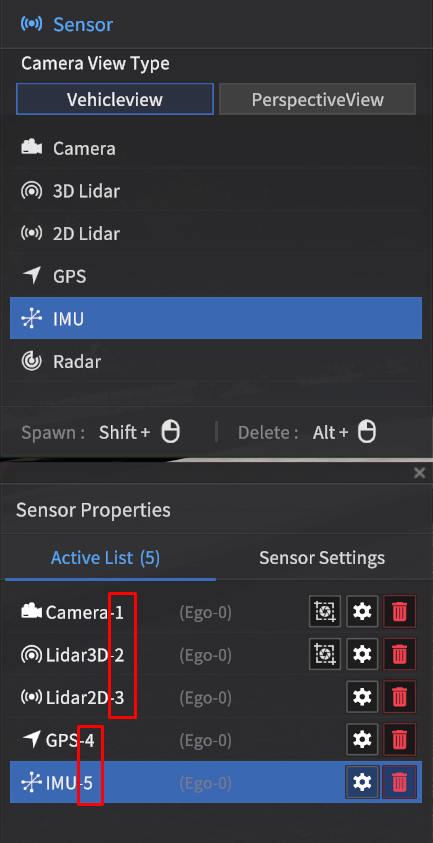
SensorPoseSubscriber
Message Type : morai_msgs/SensorPosControl
Default Topic : /SensorPosControl
No | Name | Type | Unit | Remarks |
|---|---|---|---|---|
1 | sensor_index | int16 | - | 위치를 제어할 센서 인덱스 번호 이름 |
2 | pose_x | float32 | m |
|
3 | pose_y | float32 | m |
|
4 | pose_z | float32 | m |
|
5 | roll | float32 | rad | Sensor roll angle |
6 | pitch | float32 | rad | Sensor pitch angle |
7 | yaw | float32 | rad | Sensor yaw angle |
Ego Network (통신 방식: Service Model)
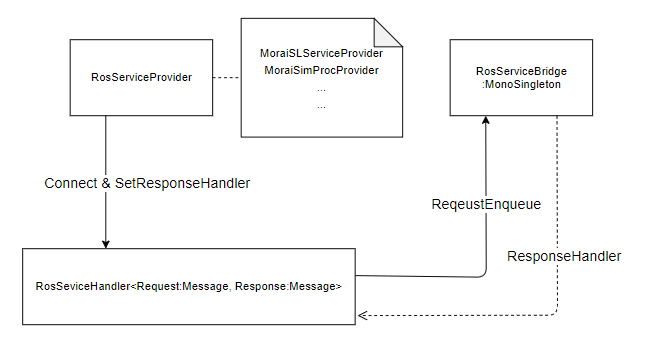
Service 통신 방식으로 주고받는 ROS 메시지 프로토콜에 대한 설명한다.
ROS 통신으로 시뮬레이터를 제어하는데 있어서, Pub/Sub 방식 뿐 아니라 아래와 같은 Service 방식 또한 지원한다.
기본 구조
ROSBAG 호출 메시지
Morai SimProcService Provider(User → Sim)
Service Name : /Morai_SimProc
srv : morai_msgs/MoraiSimProcSrv
Request Message Type : morai_msgs/MoraiSimProcHandle
int8 sim_process_status
0x01(Play)
0x10(Pause)
0x20(Stop - replay 모드에서만 사용 replay 를 완전 종료)
아래 부터 mode = 0x10 (replay 모드) 일 때만 사용 가능하다.
short replay_option
0x0001 (load file)
0x0010 (target)
0x0100 (start time)
0x1000 (배속 조절)
파일을 새로 로드 하고 target 을 지정하고 싶으면
0x0011 (start time은 default로 0초부터 시작)
리플레이 중에 target을 지정하고 시작지점을 변경하고자 할 때
0x0110 (리플레이 중이 아니라면 SimProcStatus에서 에러 result 를 보낸다.)
string rosbag_file_name
short replay_target_option
0x0001 (Ego)
0x0010 (NPC)
0x0100 (Pedestrian)
float start_time (millisecond)
int32 replay_speed (추가)
배속 값(1배속, 2배속…)
Response Message Type : morai_msgs/MoraiSrvResponse
bool result : Service request 에 대한 결과
이벤트 제어 요청 메시지
Morai Event Cmd Service Provider (User → Sim)
Service Name : /Service_MoraiEventCmd
srv : morai_msgs/MoraiEventCmdSrv
Request Message Type : morai_msgs/EventInfo
int8 option : 이벤트 제어를 요청하는 필드 옵션
1 : ctrl_mode
2 : gear
4 : lamps
8 : set_pause
int32 ctrl_mode : 차량의 control mode 제어
1 : Keyboard
2 : GameWheel
3 : AutoMode
4 : AutoMode_Lateral
5 : AutoMode_Longitudinal
6 : CruiseMode
7 : SynchronousMode
int32 gear : 차량의 기어 변경
-1 : 이전 상태 유지
1 : P
2 : R
3 : N
4 : D
morai_msgs/Lamps lamps : 방향 지시등 제어
Header header
int8 turnSignal
0 : No Signal
1 : Left Signal
2 : Right Signal
3 : 이전 상태 유지
int8 emergencySignal
0 : No Signal
1 : Emergency Signal
bool set_pause
True : 시뮬레이터 Pause 상태로 유지 (Esc 키를 입력하여 Play 상태 전환 가능)
False : 시뮬레이터 Play 상태로 전환
Response Message Type : morai_msgs/MoraiEventCmdSrv
int32 ctrl_mode : 차량의 control mode 현재 상태
int32 gear : 차량의 기어 현재 상태
morai_msgs/Lamps lamps : 방향 지시등 현재 상태
bool set_pause : 시뮬레이터 현재 상태
MAP 데이터 호출 메세지
Morai Map Spec Service Provider(User → Sim)
Service Name : /Service_MoraiMapSpec
srv : morai_msgs/MoraiMapSpecSrv
Request Message Type : morai_msgs/MapSpecIndex
bool load_map_data : 맵 데이터 호출 유무 (현재는 True False 모두 Map 데이터를 호출한다)
True : map_data_load
False : map_data_load
Response Message Type : morai_msgs/MapSpec
int32 plane_coordinate_system : 맵의 평면 좌표계 정보
0 : UTM (Virtual Map 은 UTM 으로 표시된다.)
1 : TM
int32 utmNum : UTM Zone 정보
한반도는 대부분 52 Zone 이다.
TM 과 Virtual Map 인 경우 0 이 나온다.
geometry_msgs/Vector3 UTMoffset : 맵의 오프셋 정보
float64 x : x
float64 y : y
float64 z : z
String ellipse : 타원체 종류
“WGS84”
“GRS80”
둘중 한가지 데이터가 나온다. (Virtual Map 의 경우 WGS84 로 출력)
float64 Central_latitude: central latitude (y-axis origin)
float64 Central_Meridian : central meridian (x-axis origin)
float64 ScaleFactor :
float64 FalseEasting : X 좌표 동위 이동 추가 값
float64 FalseNorthing : Y 좌표 북위 이동 추가 값
Simulator Network (통신 방식: Publish - Subscribe Model)
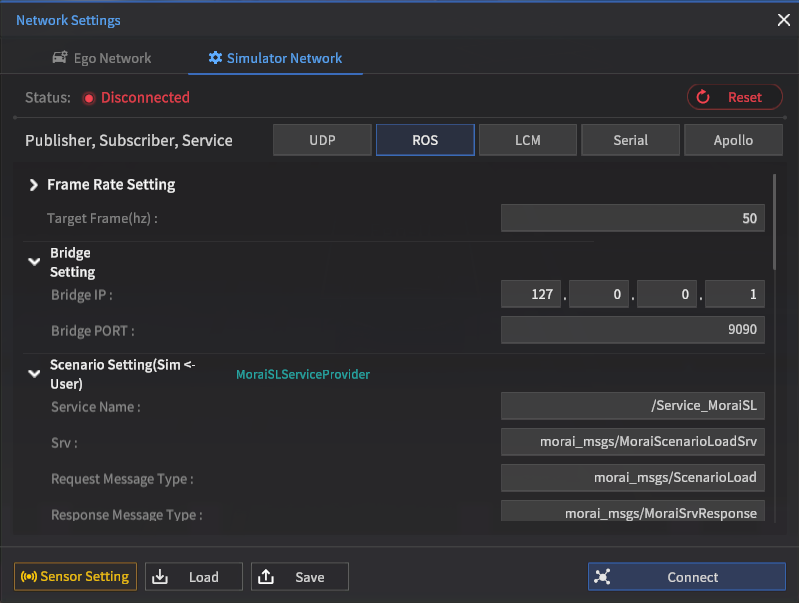
Simulator Network
MoraiSImprocStatusPublisher
MoraiSImprocStatusPublisher (Sim → User)
Message Type : morai_msgs/MoraiSimProcStatus
Default Topic : /sim/process/state/msg/MoraiSimProcStatus
Header header
uint8 sim_process_status
1 : play
2 : Pause
Time latest_command_time
마지막 SimProcHandler값이 들어온 시간 (SimProcHandler/header에 있는 시간 사용)
아직 한 번도 안들어 왔다면 0
int8 command_result
0x00 (한 번도 데이터가 들어오지 않았을 경우)
0x01(success)
0xn0(fail)
0x10: fail
0x20: fail to load rosbag file
0x30: load rosbag file first
int8 current_mode
0x01(Simulation)
0x10(Replay)
int8 current_status
0x01(Playing)
0x10(Paused)
0x20(Paused, end of rosbag file → replay 모드에서만 사용 됨)
No | Name | Type | Unit | Remarks |
|---|---|---|---|---|
1 | header | Header | - |
|
2 | latest_command_time | - | 마지막 SimProcHandler 값이 들어온 시간 (SimProcHandler/header에 있는 시간 사용) 아직 한 번도 안들어 왔다면 0 | |
3 | command_result | int8 | - | 0x00: initial, 0x01: success, 0x10: command failed, 0x20: failed rosbag file load, 0x30: loaded rosbag but failed |
4 | current_mode | int8 | - | 0x01: simulation mode, 0x10: replay mode |
5 | current_status | int8 | - | 0x01: running, 0x10: paused, 0x20: paused and reached end of rosbag file |
Multi Ego Setting
Multi_Ego 제어 명령
MultiEgoTransformHandler (User → Sim)
Message Type : morai_msgs/MultiEgosetting
Default Topic : /ego_setting
타입 설명 : MultiEgo 에 대한 정보 메세지 타입
No | Name | Type | Unit | Remarks |
|---|---|---|---|---|
1 | number_of_ego_vehicle | int32 | - | Multi_ego vehicle 의 수 |
2 | camera_index | int32 | - | Multi_ego 세팅 시 바라볼 차량의 unique index |
3 | ego_index | int32[] | - | 제어할 Multi_ego 의 unique index |
4 | global_position_x | float64[] |
| Multi_ego의 현재 X-axis 위치 |
5 | global_position_y | float64[] |
| Multi_ego의 현재 Y-axis 위치 |
6 | global_position_z | float64[] |
| Multi_ego의 현재 Z-axis 위치 (elevation) |
7 | global_roll | float32[] |
| Multi_ego의 현재 roll 각도 |
8 | global_pitch | float32[] |
| Multi_ego의 현재 pitch 각도 |
9 | global_yaw | float32[] |
| Multi_ego의 현재 heading 각도 |
10 | velocity | float32[] |
| Multi_ego의 velocity |
11 | gear | int8[] | - | 1: Parking, 2: Reverse, 3: Neutral, 4: Drive |
12 | ctrl_mode | int8[] | - | 1: keyboard mode, 16: automode |
NPC Vehicle Collision Data
NPC 충돌 정보
VehicleCollisionInfoPublisher (Sim → User)
Message Type : morai_msgs/VehicleCollisionData
Default Topic : /VehicleCollisionData
타입 설명 : NPC 차량의 충돌 데이터를 나타내는 메시지
Header header
VehicleCollision[] collisions : 충돌 NPC 차량 List
ObjectStatus[] crashed_vehicles : 충돌한 NPC 차량 정보 (아래의 ObjectStatus 타입 참고)
No | Name | Type | Unit | Remarks |
|---|---|---|---|---|
1 | header | Header | - |
|
2 | collisions | - | 충돌한 NPC 차량의 목록 |
Vehicle Collision List
VehicleCollision 는 VehicleCollisionInfoPublisher 에서 사용되는 목록으로 독립되어서 사용되는 ROS Topic 이 없습니다.
ROS message details
Message Type: morai_msgs/VehicleCollision
No | Name | Type | Unit | Remarks |
|---|---|---|---|---|
1 | crashed_vehicles | - | 충돌한 NPC 차량의 정보 |
Simulator Network (통신 방식: Service Model)
ScenarioLoad 메시지
Morai SLService Provider (User → SIM)
Service Name : /Service_MoraiSL
srv : morai_msgs/MoraiScenarioLoadSrv
Request Message Type : morai_msgs/ScenarioLoad
string file_name : load 할 Scenario_file_name
bool delete_all
True : Ego 를 제외한 Scenario Data 를 Delete 하고 Load
False : 모든 Scenario Data Load
delete_all 이 False 일때 아래의 Load Option 을 사용해서 원하는 Scenario Data Load 가능
bool load_ego_vehicle_data
True : Ego Scenario Data Load
False : Ego Scenario Data Load 안 함
bool load_surrounding_vehicle_data
True : NPC Vehicle Scenario Data Load
False : NPC Vehicle Scenario Data Load 안 함
bool load_pedestrian_data
True : pedestrian Scenario Data Load
False : pedestrian Scenario Data Load 안 함
bool load_object_data
True : Object Scenario Data Load
False : Object Scenario Data Load 안 함
bool set_pause
True : Scenario Load 후 Pause 상태로 유지 (Esc 키를 입력하여 Play 상태 전환 가능)
False : Scenario Load 후 바로 Play 상태로 전환
Response Message Type : morai_msgs/MoraiSrvResponse
bool result : Service request 에 대한 결과
MoraiSImprocService Provider
Morai SimProcService Provider(User → Sim)
Service Name : /Morai_SimProc
srv : morai_msgs/MoraiSimProcSrv
Request Message Type : morai_msgs/MoraiSimProcHandle
int8 sim_process_status
0x01(Play)
0x10(Pause)
0x20(Stop - replay 모드에서만 사용 replay 를 완전 종료)
아래 부터 mode = 0x10 (replay 모드)일 때만 사용 가능하다
short replay_option
0x0001 (load file)
0x0010 (target)
0x0100 (start time)
0x1000 (배속 조절)
파일을 새로 로드 하고 target 을 지정하고 싶으면
0x0011 (start time 은 default 로 0초부터 시작)
리플레이 중에 target 을 지정하고 시작지점을 변경하고자 할 때
0x0110 (리플레이 중이 아니라면 SimProcStatus 에서 에러 result 를 보낸다.)
string rosbag_file_name
short replay_target_option
0x0001 (Ego)
0x0010 (NPC)
0x0100 (Pedestrian)
float start_time(millisecond)
int32 replay_speed (추가)
배속 값 (1배속, 2배속…)
Response Message Type : morai_msgs/MoraiSrvResponse
bool result : Service request 에 대한 결과
Traffic Light 상태 호출 메시지
Morai SLService Provider (User → Sim)
Service Name : /Morai_TLSrv
srv : morai_msgs/MoraiTLInfoSrv
Request Message Type : morai_msgs/MoraiTLIndex
string idx : Traffic Light Idx
Response Message Type : morai_msgs/MoraiTLInfo
Header header
string idx : Traffic Light Idx
int16 status : Traffic Light의 상태 정보
1 : RED
4 : Yellow
5 : Red with Yellow
16 : Green
20 : Green with Yellow
32 : Left Arrow
33 : Left Arrow with Red
36 : Left Arrow with Yellow
48 : Left Arrow with Green
차량 스펙 호출 메시지
Morai Vehicle Spec Service Provider (User → Sim)
Service Name : /Service_MoraiVehicleSpec
srv : morai_msgs/MoraiVehicleSpecSrv
Request Message Type : morai_msgs/VehicleSpecIndex
int32 unique_id : 차량의 unique_id
Response Message Type : morai_msgs/VehicleSpec
int32 ctrl_mode : 차량의 control mode 현재 상태
geometry_msgs/Vector3 position : 차량의 크기 벡터
float64 x : 물체의 x(m단위) 크기
float64 y : 물체의 y(m단위) 크기
float64 z : 물체의 z(m단위) 크기
float32 wheel_base : 차량의 wheel base (단위: m) 길이
float32 Overhang : 차량의 OverHang (단위: m) 길이
float32 Rear OverHang : 차량의 Rear OverHang (단위: m) 길이
float64 max_steering : 차량의 최대 스티어링 (단위: degree)